F5 Solutions for Containers > Class 3- Application Deployments with BIG-IP and Application Services (AS3) Source |
Lab 6 - Creating a Applications using AS3 Declarative Interface & BIG-IQ
In this lab, we will create a simple HTTP application using AS3 via BIG-IQ.
Unless instructed, throughout this section we will be working in the BIG-IQ Collection in Postman.
If the error Cannot find any ADC root nodes for the target devices occurs, follow directions here: https://clouddocs.f5.com/products/extensions/f5-appsvcs-extension/latest/userguide/troubleshooting.html
Exercise 1 - Ensure BIG-IP devices are in sync
Before BIG-IQ can be used to perform application creation via AS3, all BIG-IP devices in a config sync group must be in sync. In order to show how AS3 can do the configuration creation on both devices, the BIG-IP devices in the lab are configured with manual sync. Due to that, you need to ensure the two BIG-IP devices are in sync before starting this section of the lab. of this lab.
- Open the
Authenticate to BIG-IPrequest. Sendthe request, and ensure you receive a 200 OK response.- Open the
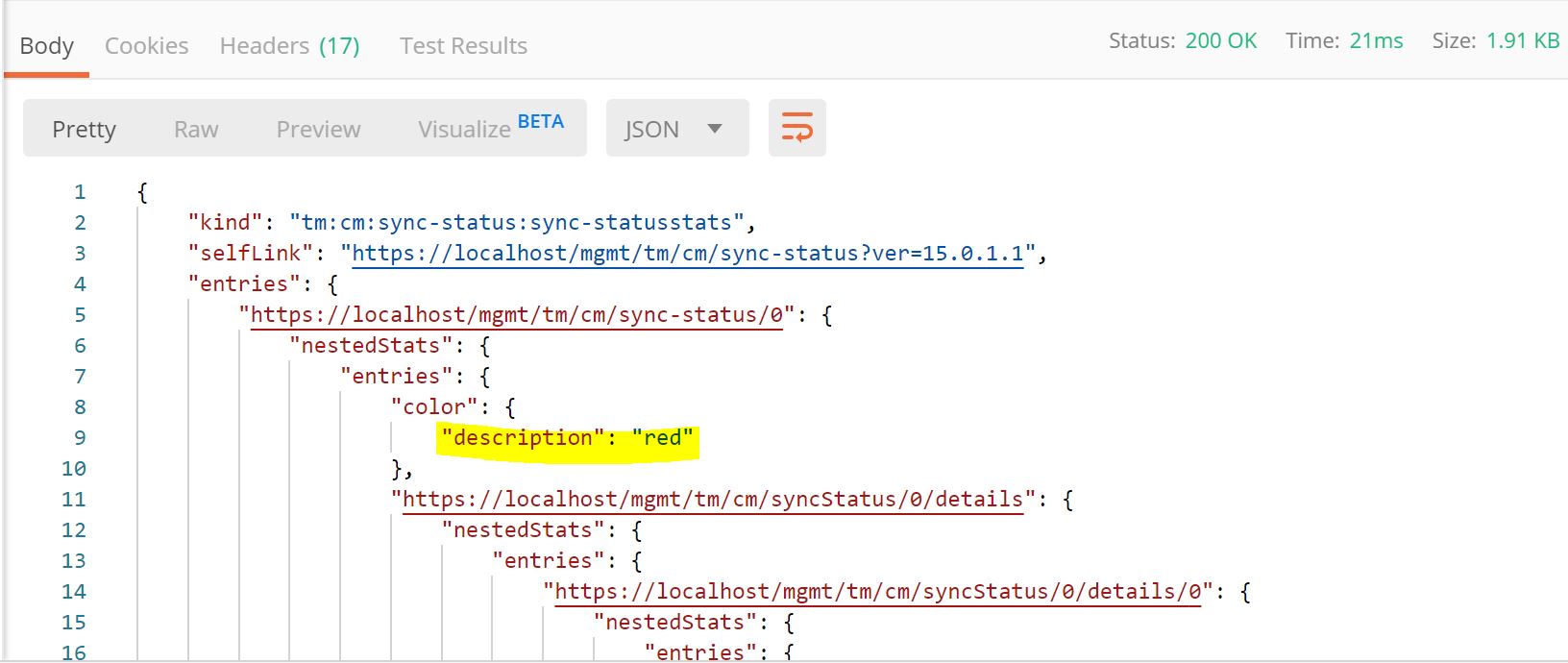
BIG-IP: Get sync statusrequest. Sendthe request, and ensure you receive a 200 OK response.- Look at the data returned in the request. If it has a status of
redreported, then you will need to complete the other steps in this exercise. If the status is reported asgreen, then you can proceed to Exercise 2.
- Open the
BIG-IP: sync failoverGrouprequest, and clickSend. - Ensure you receive a 200 OK response.
- Open the
BIG-IP: sync datasync-global-dgrequest, and clickSend. - Ensure you receive a 200 OK response.
- Open the
BIG-IP: Get sync statusrequest, and clickSend. - Ensure you receive a 200 OK response.
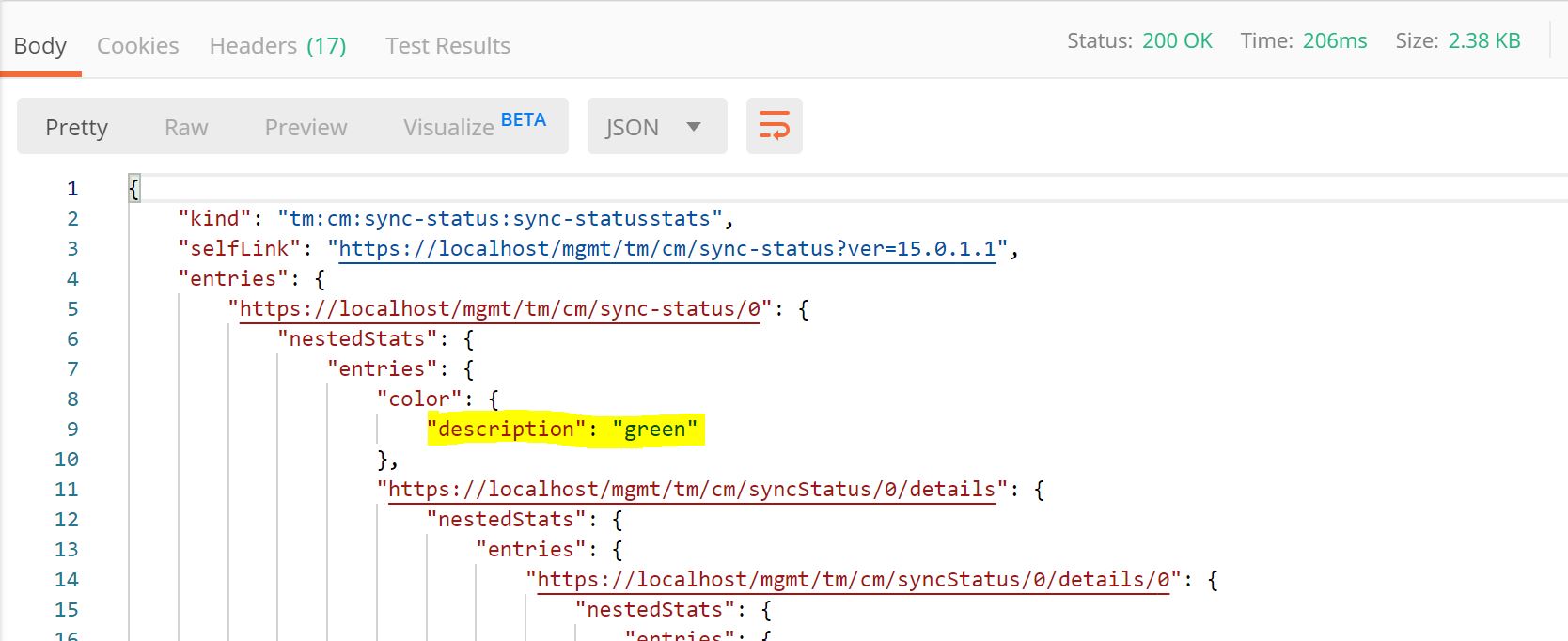
- Look at the data returned in the request. If it has a status of
greenreported.
Exercise 2 - Authenticate to the BIG-IQ
Open the
Authenticate to BIG-IQrequest. Note that tokens need to be refreshed after 5 minutes. 401 Errors will occur if the token is bad or old. Resending this request will refresh the token.Click on the
Bodysection of the POST Request. The body will look like the following1 2 3 4 5
{
    "username": "admin",
    "password": "admin",
    "loginProviderName": "tmos"
}
Click the blue
Sendbutton. Ensure that you receive a 200 OK response.
Exercise 3 - Deploy and Delete an App without an App Template on BIG-IQ
Open the
Deploy App w/o Templaterequest.Click on the
Bodysection of the POST Request. The body will look like the following1 2 3 4 5 6 7 8 9 10 11 12 13 14 15 16 17 18 19 20 21 22 23 24 25 26 27 28 29 30 31 32 33 34 35 36 37 38 39
{
    "class": "AS3",
    "declaration": {
        "class": "ADC",
        "schemaVersion": "3.7.0",
        "id": "thisisanid",
        "label": "App1",
        "remark": "HTTP with custom persistence",
        "target": {
            "hostname": "bigip01.as3lab.com"
        },
        "DemoService": {
            "class": "Tenant",
            "A1": {
                "class": "Application",
                "template": "http",
                "serviceMain": {
                    "class": "Service_HTTP",
                    "virtualAddresses": [
                        "10.1.20.50"
                    ],
                    "pool": "web_pool"
                },
                "web_pool": {
                    "class": "Pool",
                    "monitors": [
                        "http"
                    ],
                    "members": [{
                    "servicePort": 8080,
                    "serverAddresses": [
                        "10.1.10.30"
                    ]
                    }]
                }
            }
        }
    }
}
Looking further into this request, the URI is sent to the IP address of BIG-IQ instead of the BIG-IP address per past requests. The
targetin the declaration shows that BIG-IQ will create the configuration onbigip01.as3lab.com. The rest of the declaration is just like what you would send directly to a BIG-IP device.Click the blue
Sendbutton. Ensure that you receive a 200 OK response.This application is now in the
Demo Servicepartition on the BIG-IP (10.1.1.4).Login to the BIG-IP to confirm changes. Open Chrome and navigate to https://10.1.1.4 (or you can click on the
BIG-IP01bookmark in Chrome).Login with the following credentials: username = admin , password = admin.
Login to the BIG-IQ to confirm changes. Open Chrome and navigate to https://10.1.1.7 (or you can click on the
BIG-IQbookmark in Chrome).On BIG-IQ, navigate to Applications -> Applications screen to view the deployed application.
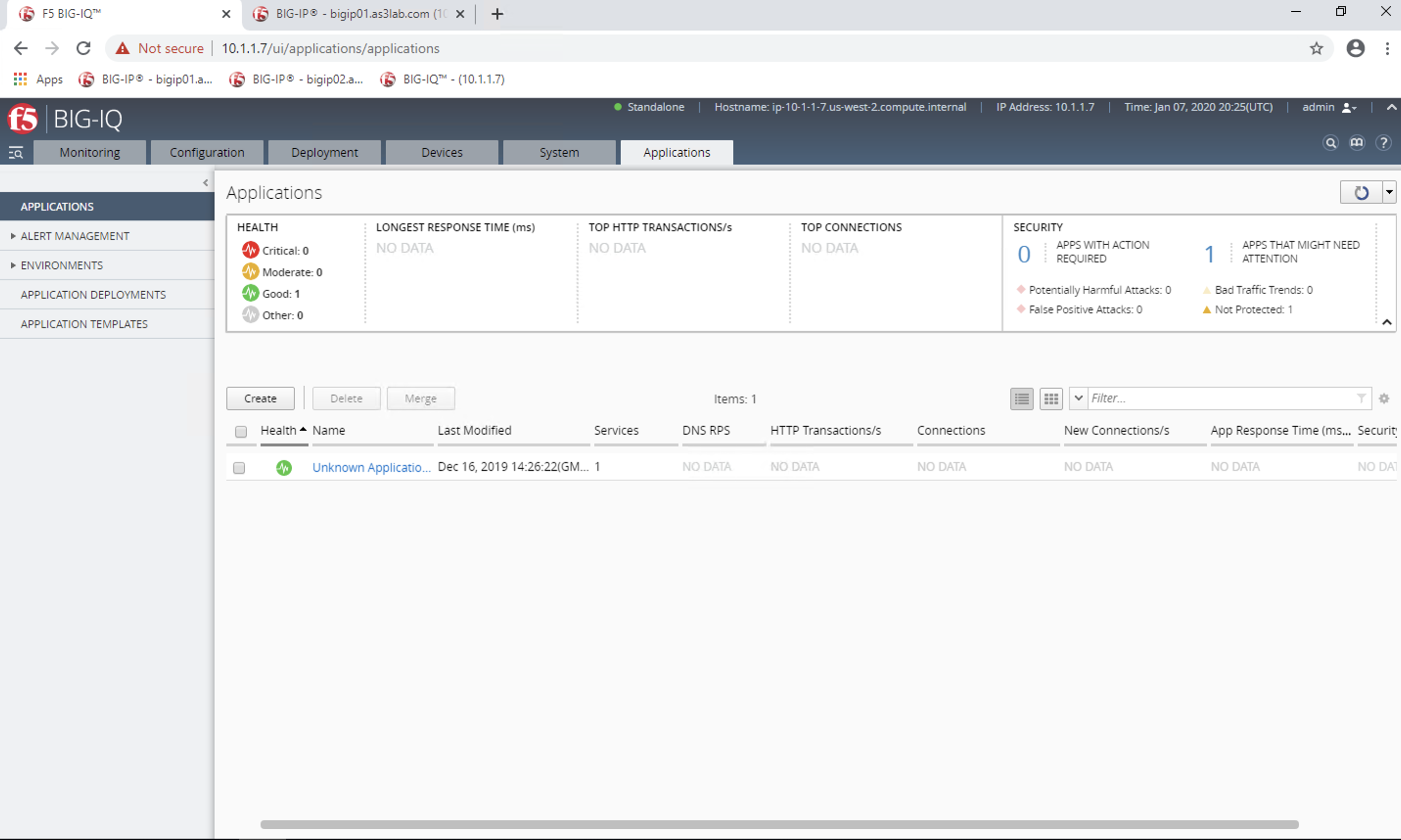
Now we will move our applciations from
Unknown Applicationsto another tile namedKnown Applications.SendtheGet Application Referencerequest to set the variable_bigiq_app_ref. Look at theTestswindow for the declaration to see the variable being set, whcih will be used in the following step.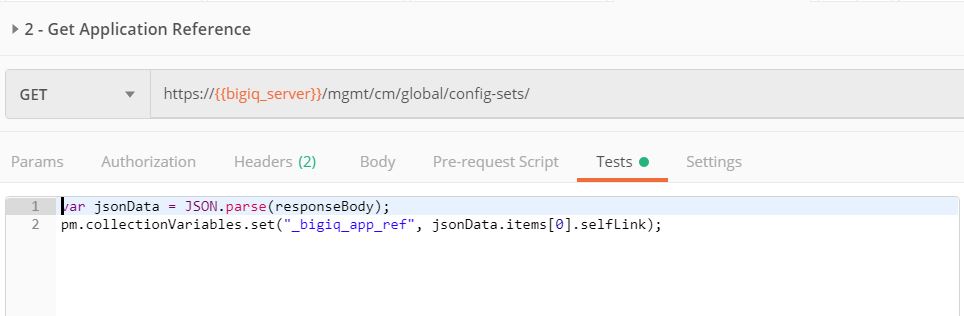
Open the
Move out of Unknown Apprequest.Look at the
Body` of the request, and you will see that we are moving the application to ``Known Applications. You could name this to any string.Click the blue
Sendbutton. Ensure that you receive a 200 OK response.Navigate back to the
BIG-IQApplicationstab, and you will see that our app is now under theKnown Applicationstile.Now that we have had some fun, lets delete the app. Open the
Delete App w/o Templaterequest.Click the blue
Sendbutton. Ensure that you receive a 200 OK response.This application is now deleted from
BIG-IQandBIG-IP(10.1.1.4).
Exercise 4 - Deploy, Change and Delete Apps via App Templates on BIG-IQ
Open the
Upload App Template to BIG-IQrequest. Note that this this request was taken from https://github.com/f5devcentral/f5-big-iq.Click on the
Bodysection of the POST Request. The body will look like the following1 2 3 4 5 6 7 8 9 10 11 12 13 14 15 16 17 18 19 20 21 22 23 24 25 26 27 28 29 30 31 32 33 34 35 36 37 38 39 40 41 42 43 44 45 46 47 48 49 50 51 52 53 54 55 56 57 58 59 60 61 62 63 64 65 66 67 68 69 70 71 72 73 74 75 76 77 78 79 80 81 82 83 84 85 86 87 88 89 90 91 92 93 94 95 96 97 98 99 100 101 102 103 104 105 106 107 108 109 110 111 112 113 114 115 116 117 118 119 120 121 122 123 124 125 126 127 128 129 130 131 132 133 134 135 136 137 138 139 140 141 142 143 144 145 146 147 148 149 150 151 152 153 154 155 156 157 158 159 160 161 162 163 164 165 166 167 168 169 170 171 172 173 174 175 176 177 178 179 180 181 182 183 184 185 186 187 188 189 190 191 192 193 194 195 196 197 198 199 200 201 202 203 204 205 206 207 208 209 210 211 212 213 214 215 216 217 218 219 220 221 222 223 224 225 226 227 228 229 230 231 232 233 234 235 236 237 238 239 240 241 242 243 244 245 246 247 248 249 250 251 252 253 254 255 256 257
{ "description": "For load balancing an HTTP application on port 80.", "name": "AS3-F5-HTTP-lb-template-big-iq-default-v1", "published": true, "isUICompatible": true, "tenant": { "name": "", "override": false, "editable": true }, "schemaOverlay": { "type": "object", "properties": { "class": { "type": "string", "const": "Application" }, "template": {}, "schemaOverlay": {}, "label": {}, "remark": {} }, "additionalProperties": { "allOf": [ { "anyOf": [ { "properties": { "class": { "const": "Analytics_Profile" } } }, { "properties": { "class": { "const": "HTTP_Profile" } } }, { "properties": { "class": { "const": "Pool" } } }, { "properties": { "class": { "const": "Service_HTTP" } } } ] }, { "if": { "properties": { "class": { "const": "Analytics_Profile" } } }, "then": { "$ref": "#/definitions/Analytics_Profile" } }, { "if": { "properties": { "class": { "const": "HTTP_Profile" } } }, "then": { "$ref": "#/definitions/HTTP_Profile" } }, { "if": { "properties": { "class": { "const": "Pool" } } }, "then": { "$ref": "#/definitions/Pool" } }, { "if": { "properties": { "class": { "const": "Service_HTTP" } } }, "then": { "$ref": "#/definitions/Service_HTTP" } } ] }, "required": [ "class" ], "definitions": { "Analytics_Profile": { "properties": { "class": {}, "collectUserAgent": { "type": "boolean" }, "collectClientSideStatistics": { "type": "boolean", "default": true }, "collectGeo": { "type": "boolean" }, "collectUrl": { "type": "boolean" }, "collectPageLoadTime": { "type": "boolean" }, "collectOsAndBrowser": { "type": "boolean", "default": false }, "collectMethod": { "type": "boolean", "default": false }, "collectResponseCode": { "type": "boolean", "default": true }, "collectIp": { "type": "boolean" } }, "type": "object", "additionalproperties": false }, "HTTP_Profile": { "properties": { "class": {}, "fallbackRedirect": { "type": "string", "default": "https://www.example.com/404" }, "fallbackStatusCodes": { "type": "array", "default": [ 404 ] } }, "type": "object", "additionalproperties": false }, "Pool": { "properties": { "class": {}, "members": { "type": "array", "items": { "type": "object", "properties": { "servicePort": { "type": "number", "default": 80 }, "monitors": { "type": "array", "default": [ "http" ], "const": [ "http" ] }, "adminState": { "type": "string", "default": "enable" }, "shareNodes": { "type": "boolean", "default": true, "const": true }, "serverAddresses": { "type": "array" } } } }, "monitors": { "type": "array", "default": [ "http" ], "const": [ "http" ] } }, "type": "object", "additionalproperties": false }, "Service_HTTP": { "properties": { "class": {}, "virtualPort": { "type": "number", "default": 80 }, "profileAnalytics": { "type": "object", "properties": { "use": { "type": "string", "default": "Analytics_Profile" } } }, "profileHTTP": { "type": "object", "properties": { "use": { "type": "string", "default": "HTTP_Profile" } } }, "virtualAddresses": { "type": "array" }, "pool": { "type": "string", "default": "Pool" }, "enable": { "type": "boolean", "default": true } }, "type": "object", "additionalproperties": false } } } }
Looking further into this request Lines 3 names the application template. Line 4 marks the application template as published. Lines 11-257 defines the schema for the application template.
Click the blue
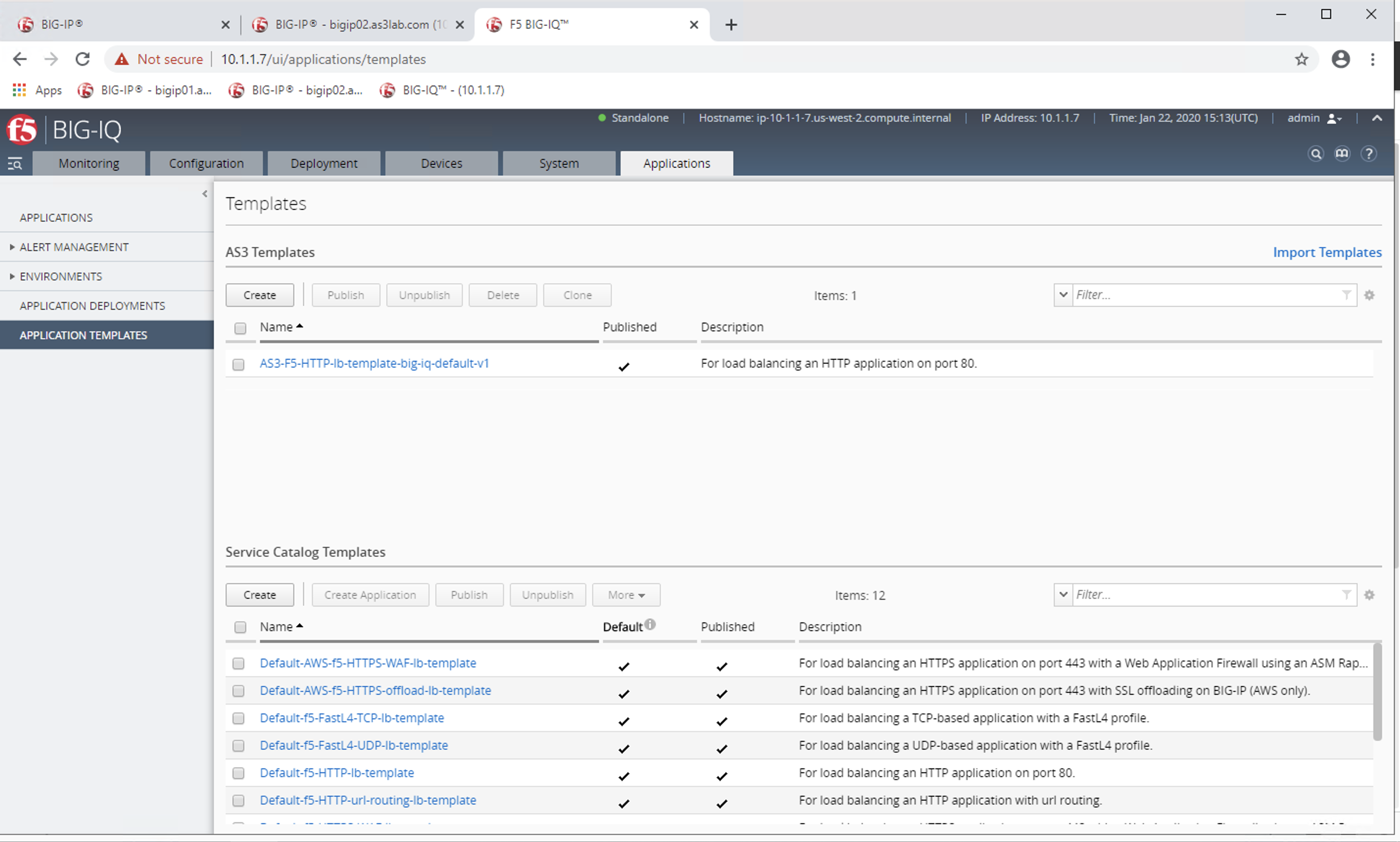
Sendbutton. Ensure that you receive a 200 OK response.To view the template we just uploaded, navigate to Chrome, BIG-IQ bookmark 10.1.1.7 (username = admin, password = admin).
On BIG-IQ, navigate to Applications -> Application Templates.
In Postman, open the
Create App2 with Templaterequest.Click on the
Bodysection of the POST Request. The body will look like the following1 2 3 4 5 6 7 8 9 10 11 12 13 14 15 16 17 18 19 20 21 22 23 24 25 26
{
    "class": "AS3",
    "declaration": {
        "class": "ADC",
        "target": {
            "hostname": "bigip01.as3lab.com"
        },
        "schemaVersion": "3.7.0",
        "DemoService": {
            "class": "Tenant",
            "App2": {
                "class": "Application",
                "schemaOverlay": "AS3-F5-HTTP-lb-template-big-iq-default-v1",
                "template": "http",
                "serviceMain": {
                    "class": "Service_HTTP",
                    "virtualAddresses": ["10.0.2.23"],
                    "pool": "web_pool"
                },
                "web_pool": {
                    "class": "Pool"
                }
            }
        }
    }
}
Looking further into this request. Line 13 defines the schema that we are going to use
AS3-F5-HTTP-lb-template-big-iq-default-v1.Click the blue
Sendbutton. Ensure that you receive a 200 OK response.This application is now in the
Unknown Applicationssection on theBIG-IQApplicationdashboard, and it is in theDemo Servicepartition on the BIG-IP (10.1.1.4).Now we will change this application. Open the
Change App2request.Click on the
Bodysection of the POST Request. Notice the changed IP address for thevirtualAddress.1 2 3 4 5 6 7 8 9 10 11 12 13 14 15 16 17 18 19 20 21 22 23 24 25 26 27
{
    "class": "AS3",
    "action": "patch",
    "patchBody": [
        {
            "class": "ADC",
            "target": {
                "address": "10.1.1.4"
            },
            "op": "replace",
            "path": "/DemoService/App2",
            "value": {
                "class": "Application",
                "schemaOverlay": "AS3-F5-HTTP-lb-template-big-iq-default-v1",
                "template": "http",
                "serviceMain": {
                    "class": "Service_HTTP",
                    "virtualAddresses": ["10.0.2.24"],
                    "pool": "web_pool"
                },
                "web_pool": {
                    "class": "Pool"
                }
            }
        }
    ]
}
Click the blue
Sendbutton. Ensure that you receive a 200 OK response.This application is now changed on
BIG-IQandBIG-IP.Now we will delete the app. Open the
Delete App from Templaterequest.Click the blue
Sendbutton. Ensure that you receive a 200 OK response.This application is now deleted from BIG-IQ and BIG-IP (10.1.1.4).